Malware Uses Sendspace to Store Stolen Documents
Beware of bogus FedEx emails asking you to review a shipment notification - the attached Fedex_Invoice.exe is actually a downloader Trojan that opens you computer to other pieces of malware.
In this particular case spotted by Trend Micro researchers, it downloads and executes a Trojan that searches for and snatches MS Word and Excel documents from the infected machine.
"The collected documents are then archived and password-protected using a random-generated password in the user’s temporary folder," they share. And after creating the archive, it sends it to sendspace.com, a file hosting service that allows its users to send, receive, track and share files.
Once the archive is uploaded, the malware retrieves the Sendspace download link, and then sends it to the C&C server operated by the crooks along with the password needed to open it.
This is not the first time that Sendspace has been used by cyber thieves to store stolen data, and the same can be said for other free online hosting services.
Unfortunately, the criminals have realized that these legitimate services allow them to forgo the need of operating their own drop zones.
Showing posts with label Microsoft Office. Show all posts
Showing posts with label Microsoft Office. Show all posts
Thursday, February 9, 2012

Saturday, August 6, 2011
Hospital Networks are the next big target for hackers?
Medical Device Security in a Hospital Network
Medical devices are everywhere today. In your doctors office measuring your blood pressure, at your cosmetician (for hip reductio) and in the hospital for everything from patient monitoring to robot-assisted surgery.
The people that develop embedded medical devices based on Intel platforms know that Windows is vulnerable.
Lacking embedded Linux know-how, medical device developers often end up adopting Windows and Visual Studio as a default. Using Windows is a security-blanked for developers who grew up the Microsoft monoculture and are scared of the Linux command line.
But – make no mistake using Windows in networked embedded medical devices is a mistake.
It is crucial to use threat analysis on systems of networked medical devices in order to arrive at the right, cost-effective countermeasures (apropos the management challenge of large number of VLANS…). Threat analysis must be an integral part of the SDLC (software development life cycle) – done early in the process and validated from time to time whenever there are significant design, configuration or environmental changes.
Threat analysis enables a medical device vendor and the hospital security team to have an objective discussion on balancing the need to protect the hospital network asset with protecting the availability of the medical device itself and concomitantly – the safety of patients that are dependent on the device – patient monitoring is the first example that comes to mind.
To use an analogy from the world of real time embedded systems – consider avionics as key to safety of the pilot and success of the mission. Avionics are not managed like a network of Windows PCs and neither should medical devices on the hospital network.
A medical device in a hospital network – whether it monitors patients, assists in surgery or analyzes EEGs – is an embedded device in a extremely heterogeneous and hostile environment that should simply not be vulnerable to Microsoft Windows malware.
Embedded medical devices should be based in embedded Linux – and not a stock version of Red Hat – but rather built ground up from the latest Linux kernel, with the minimum set of services and software (Qtk etc…) needed to run the application. The software update process should be part of the design – not something bolted on after the implementation.
Developing for embedded Linux is not copy and paste from Windows. It requires expertise to setup the basic infrastructure. But – once that infrastructure is up, the medical device developer and it’s hospital customer can be confident that they are standing on a secure platform and not a house of glass built on a foundation of sand.
Medical devices are everywhere today. In your doctors office measuring your blood pressure, at your cosmetician (for hip reductio) and in the hospital for everything from patient monitoring to robot-assisted surgery.
The people that develop embedded medical devices based on Intel platforms know that Windows is vulnerable.
Lacking embedded Linux know-how, medical device developers often end up adopting Windows and Visual Studio as a default. Using Windows is a security-blanked for developers who grew up the Microsoft monoculture and are scared of the Linux command line.
But – make no mistake using Windows in networked embedded medical devices is a mistake.
This is big mistake #1.In product development (and medical device are no exception), the support and version update process is often something left for the end of the project. At that point, when the product manager asks how are we going to update the software in the field – the hands raise in favor of USB memory stick updates as an “interim” solution.
The top 2 threats to a medical device are software defects and software updates. Consider the implications of updating patient monitoring devices in a hospital with an infected USB stick or an infected Windows notebook.
It is crucial to use threat analysis on systems of networked medical devices in order to arrive at the right, cost-effective countermeasures (apropos the management challenge of large number of VLANS…). Threat analysis must be an integral part of the SDLC (software development life cycle) – done early in the process and validated from time to time whenever there are significant design, configuration or environmental changes.
Threat analysis enables a medical device vendor and the hospital security team to have an objective discussion on balancing the need to protect the hospital network asset with protecting the availability of the medical device itself and concomitantly – the safety of patients that are dependent on the device – patient monitoring is the first example that comes to mind.
Unfortunately many device vendors and their hospital customers use a system management model based on Microsoft Windows and business IT management practices. This is big mistake #2.Medical device vendors need to assess their software security and not assume that an embedded medical device running Windows XP is no different from any other Windows PC on the network running Office 2007.
To use an analogy from the world of real time embedded systems – consider avionics as key to safety of the pilot and success of the mission. Avionics are not managed like a network of Windows PCs and neither should medical devices on the hospital network.
A medical device in a hospital network – whether it monitors patients, assists in surgery or analyzes EEGs – is an embedded device in a extremely heterogeneous and hostile environment that should simply not be vulnerable to Microsoft Windows malware.
Embedded medical devices should be based in embedded Linux – and not a stock version of Red Hat – but rather built ground up from the latest Linux kernel, with the minimum set of services and software (Qtk etc…) needed to run the application. The software update process should be part of the design – not something bolted on after the implementation.
Developing for embedded Linux is not copy and paste from Windows. It requires expertise to setup the basic infrastructure. But – once that infrastructure is up, the medical device developer and it’s hospital customer can be confident that they are standing on a secure platform and not a house of glass built on a foundation of sand.
Thursday, June 18, 2009
Microsoft Office 2003 is still widely used like Microsoft XP
Stick with standard Office file formats
To make .xls the default worksheet format, open the same dialog box and follow the same steps, with the following differences:
If you are using Microsoft Office 2008 but you send these documents to someone they mostly complain that they are still using Microsoft Office 2003 and they are having problem opening the file, here is the interim fix until Microsoft Office 2008 is widely deployed and accepted.

You can minimize file-compatibility issues by standardizing on the most common file formats. By default, OpenOffice.org saves files in Open Document Format (ODF). Microsoft's by-the-book support for ODF, unfortunately, breaks some spreadsheet files, according to a recent ZDNet blog post.
OpenOffice reads and writes Office 2007's default .docx and .xlsx XML file formats. But the older .doc and .xls formats are still the ones most often used. I suggest that you make the classic Office formats your defaults in OpenOffice. To set .doc as the document default, for example, open any OpenOffice program and do the following:
Step 1. Choose Tools, Options;
Step 2. Select General under Load/Save;
Step 2. Select General under Load/Save;
Step 3. Click Text Document under Document type in the Default file format and ODF settings section;
Step 4. Choose Microsoft Word 97/2000/XP in the Always save as drop-down menu and click OK.
Step 4. Choose Microsoft Word 97/2000/XP in the Always save as drop-down menu and click OK.
To make .xls the default worksheet format, open the same dialog box and follow the same steps, with the following differences:
Step 1. Choose Spreadsheet under Document type in the Default file format and ODF settings section;
Step 2. Choose Microsoft Excel 97/2000/XP in the Always save as drop-down list and click OK.
Step 2. Choose Microsoft Excel 97/2000/XP in the Always save as drop-down list and click OK.
If you are using Microsoft Office 2008 but you send these documents to someone they mostly complain that they are still using Microsoft Office 2003 and they are having problem opening the file, here is the interim fix until Microsoft Office 2008 is widely deployed and accepted.
Open Microsoft Office 2008 Word; click on Office button and then select word options as shown in below picture:

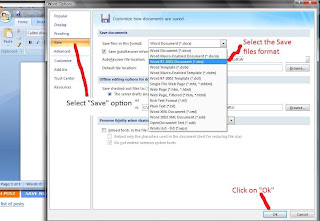
After selecting word options, click on "Save" options and then select "Word 97 - 2003" format from "Save in this file format" drop down option, as illustrated in below picture.

Repeat the same steps for Microsoft Excel 2008. Once Microsoft Office 2008 is widely accepted, you can repeat the similar steps and select .docx format as your default file saving format.
Subscribe to:
Posts (Atom)